Skip to content
In today’s fast-changing digital world, businesses are constantly looking for ways to be more efficient, flexible, and cost-effective. One of the biggest steps companies in Tampa, FL are taking is moving to the cloud. Cloud migration services help businesses transfer their data, applications, and IT infrastructure from local servers to cloud platforms like Microsoft Azure, Amazon Web Services (AWS), or Google Cloud.
If you’re a Tampa business owner wondering whether cloud migration is worth it, this guide will explain how it works, why it matters, and what benefits it brings to your organization.
What Is Cloud Migration?
Cloud migration means moving digital assets—like files, software, databases, or entire IT systems—from on-premises hardware to a cloud environment.
Instead of managing servers and storage equipment on-site, businesses use cloud-based infrastructure provided by trusted technology companies.
This process can involve:
- Moving existing applications to the cloud
- Setting up new cloud-native tools
- Hybrid solutions (part local, part cloud)
With professional cloud migration services, the transition is smooth, secure, and designed to minimize downtime. Hire us today for expert remote it support services.
Why Tampa Businesses Are Moving to the Cloud
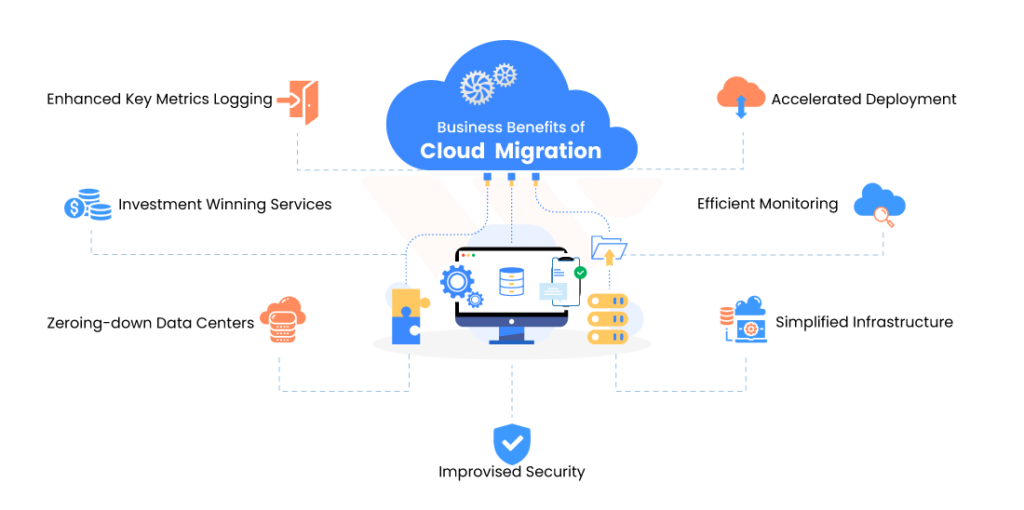
Tampa’s business community is thriving—especially in industries like healthcare, logistics, finance, and tourism. These sectors rely heavily on secure data management and smooth communication.
As technology evolves, the cloud has become the foundation for modern business operations. It offers scalability, cost savings, and accessibility that traditional IT infrastructure simply can’t match.
Whether you run a local law firm, a retail chain, or a tech startup, moving to the cloud can transform the way you work.
1. Cost Savings and Predictable Expenses
One of the main reasons Tampa businesses invest in cloud migration services is cost efficiency.
Traditional IT Costs vs. Cloud Costs:
- Traditional IT: You buy servers, networking hardware, software licenses, and pay for maintenance, upgrades, and electricity.
- Cloud Services: You pay a predictable monthly or annual subscription for what you use—no surprise costs.
Cloud providers like Microsoft Azure and AWS operate on a “pay-as-you-go” model. That means you only pay for the resources your business actually needs, which helps manage cash flow and budgeting more effectively.
Additional Savings:
- No hardware replacement or maintenance fees
- Reduced downtime (and lost revenue)
- Lower energy costs due to offsite infrastructure
2. Scalability for Growing Businesses
Tampa’s economy is expanding, and many local companies are scaling faster than ever. Cloud migration makes it easy to grow without worrying about IT limitations.
With cloud infrastructure, you can:
- Add new users or storage instantly
- Scale up during busy seasons (like tourism peaks)
- Scale down when you need fewer resources
This flexibility means your IT systems grow at the same pace as your business—without expensive upgrades or over-provisioning equipment. Get 24/7 business it support.
3. Enhanced Data Security
Some business owners hesitate to move to the cloud due to security concerns—but in reality, cloud environments are often more secure than traditional systems.
Cloud providers invest millions in cybersecurity. When you use professional cloud migration services, experts ensure:
- Data is encrypted during transfer and storage
- Multi-factor authentication is enabled
- Regular security updates and patches are applied
- Data backups and disaster recovery protocols are active
This level of protection helps Tampa businesses meet industry compliance standards and reduce the risk of data loss from cyberattacks, hurricanes, or hardware failure.
4. Improved Collaboration and Remote Access

In the era of hybrid and remote work, teams need easy access to shared files and tools—wherever they are.
Cloud-based systems make collaboration seamless. Employees can:
- Work from home, office, or on the go
- Access real-time data updates
- Use cloud tools like Microsoft 365, Google Workspace, or Slack without lag
This flexibility boosts productivity and ensures your Tampa team stays connected, even if they’re spread across different locations.
5. Business Continuity and Disaster Recovery
Florida’s hurricane season can be unpredictable. One power outage or flood can disrupt local servers, causing major data loss and downtime.
Cloud migration adds reliability and resilience through built-in disaster recovery systems. Even if your office network goes down, your data remains safe and accessible from secure cloud servers.
With automated data backups and rapid recovery, your business can keep operating smoothly—even during emergencies.
6. Better Performance and Speed
Cloud environments are built for performance. They use advanced networking technology and optimized servers to deliver faster response times.
For Tampa businesses, that means:
- Faster loading times for applications
- Improved customer experience on digital platforms
- More reliable communication tools
If your company uses large databases, video conferencing, or cloud-hosted applications, migration can make daily operations noticeably smoother.
7. Simplified IT Management
Maintaining on-premise systems requires constant updates, patches, and troubleshooting. This can overwhelm small IT teams and pull focus from strategic projects.
When you switch to managed cloud migration services, your provider handles:
- Monitoring and updates
- Security patches
- Backups and performance tuning
This frees your internal team to focus on innovation, customer service, or growth initiatives—rather than maintenance tasks.
8. Competitive Advantage
Cloud migration gives Tampa businesses access to the same advanced technology used by large enterprises—but at a fraction of the cost.
It allows small and medium-sized companies to:
- Adopt new digital tools quickly
- Leverage analytics and AI to make smarter decisions
- Respond faster to market changes
With a strong cloud foundation, your business becomes more agile and future-ready.
9. Environmental Benefits
Reducing your carbon footprint is becoming increasingly important for businesses everywhere—including Tampa.
Cloud computing is more energy-efficient than maintaining traditional servers. Data centers consolidate resources and optimize power usage, which reduces overall energy consumption.
By moving to the cloud, your business supports sustainability while lowering operational costs.
10. Future-Proofing Your Business
Technology evolves fast. Businesses that stay tied to old hardware risk falling behind.
Cloud migration ensures your systems remain up-to-date and compatible with the latest software tools. Providers automatically upgrade services and security protocols—so your business can always operate on the latest technology without manual updates or costly downtime.
How Cloud Migration Services Work
A successful migration involves several key steps. Working with a Tampa-based cloud migration provider ensures that the process is customized to your needs.
Step 1: Assessment
Experts review your existing infrastructure, identify what can move to the cloud, and outline costs and timelines.
Step 2: Planning
A detailed migration roadmap is created—selecting the right cloud platform (Azure, AWS, or Google Cloud).
Step 3: Migration
Data and applications are securely transferred to the cloud with minimal downtime.
Step 4: Testing & Optimization
After migration, systems are tested for performance, security, and reliability.
Step 5: Ongoing Support
Your provider offers maintenance, updates, and technical support to keep everything running efficiently.
Cloud Migration Costs in Tampa, FL
The cost of cloud migration services in Tampa depends on the complexity of your systems and the size of your business.
Typical price ranges:
- Small businesses: $2,000 – $10,000 total
- Mid-sized businesses: $10,000 – $50,000
- Enterprises: $50,000+
Monthly cloud service fees depend on usage but are generally cheaper than maintaining on-premise servers long-term.
Many providers also offer pay-as-you-go or subscription-based plans, allowing flexibility for Tampa companies of all sizes.
Choosing the Right Cloud Migration Partner in Tampa
When selecting a cloud migration provider, look for:
- Proven experience with local businesses
- Clear pricing and no hidden costs
- Expertise across multiple platforms (AWS, Azure, Google Cloud)
- Strong cybersecurity protocols
- Ongoing support after migration
Working with a trusted local IT partner in Tampa, FL ensures quick response times, personalized support, and a smoother experience overall.
Why Partner with a Professional Cloud Migration Service
While some businesses try to migrate on their own, doing so can lead to data loss, downtime, or compatibility issues.
Professional cloud migration services offer:
- Risk assessment and security planning
- Seamless transition with minimal disruption
- Data integrity and regulatory compliance
- Expert troubleshooting and optimization
It’s the safest and most efficient way to move your business to the cloud confidently.
Final Thoughts
Cloud technology isn’t just the future—it’s the present. For Tampa businesses looking to grow, save money, and strengthen security, cloud migration services offer clear advantages.
You’ll enjoy:
- Lower IT costs
- Enhanced flexibility
- Stronger security
- Greater collaboration
- Better business continuity
By investing in a professional cloud migration partner, your company can thrive in an increasingly digital and competitive world.
If your business in Tampa, FL is ready to make the move, start with an expert consultation today. The sooner you migrate, the sooner you’ll see the benefits.
FAQs About Cloud Migration Services in Tampa, FL
How long does a cloud migration take?
It depends on your business size and complexity. Most small to medium migrations take a few weeks, while larger enterprises may require several months.
Will my business experience downtime during migration?
Professional cloud migration providers minimize downtime by performing migrations in stages and during off-peak hours.
Is my data safe in the cloud?
Yes. Cloud platforms use encryption, multi-layered security, and redundancy to ensure your data remains safe and available.
Which cloud provider is best for Tampa businesses?
It depends on your needs. AWS, Microsoft Azure, and Google Cloud are the most popular options, each offering reliable services for local businesses.
What industries benefit most from cloud migration in Florida?
Healthcare, finance, retail, logistics, and tech companies in Florida benefit greatly from the flexibility and compliance support that cloud platforms provide.